Chemical Safety

As a research-intensive university, TMU has a number of activities that require the use of chemicals, from teaching and scientific research to our workshops and creative spaces. Chemicals used on campus may have hazards associated with them (e.g. fire, corrosion, asphyxia, explosion, etc.). TMU’s Chemical Safety program was developed to control chemical hazards and protect the university community and the environment from harmful exposure by:
- assisting and improving users knowledge of chemical hazards;
- outlining the safe handling practices of hazardous chemicals;
- ensuring regulatory compliance with respect to exposures to chemicals as well as chemical emissions into the environment; and
- fostering best practices in health and safety.
Key resource

Chemical Safety Manual
The (google doc) Chemical Safety Manual (external link) provides health and safety information on the entire lifecycle of each chemical used and stored on site, from delivery to disposal. The manual also outlines the university’s established requirements, procedures, roles and responsibilities for working with chemicals and compressed gases at TMU.
Other key documents
The Chemical Safety Manual should be used as a complementary resource to the (google doc) Laboratory Safety Manual (external link) and the (google doc) Laboratory Standard Operating Procedures (external link) (SOPs). These references act as your guide to all health and safety and the policies pertaining to research and teaching laboratories at Toronto Metropolitan University.
Training overview and instructions
Chemical safety training is mandatory for all students, faculty and staff prior to work or use of chemically hazardous materials. The table below lists the training required depending on your scope of work.
Scope of work |
Training required |
How to receive the training |
|---|---|---|
University employees (including student trainees) with minimal to no exposure to chemicals |
WHMIS for Employees is mandatory via the Employee Learning Portal (30-45 minutes) |
|
Students in academic courses that require the use of chemicals |
WHMIS for Students via D2L Brightspace (30-45 minutes) |
|
Working directly with or near chemicals (handling, storing and disposing) |
Online Chemical Safety via D2L Brightspace (45 minutes) |
|
Handling and using compressed gas |
Online Compressed Gas Cylinder Training via D2L Brightspace (45 minutes) |
|
Receiving (signing of Bill of Lading) of hazardous chemicals Transporting hazardous chemicals off-campus |
Transportation of Dangerous Goods (TDG) |
|
Accessing and using the Vertére Chemical Inventory System |
Vertére Training |
|
Accessing and using Chemwatch Safety Data Sheet System |
Video tutorial |
Workplace Hazardous Materials Information System (WHMIS)
The Workplace Hazardous Materials Information System (WHMIS) is a Canada-wide standard. Its purpose is to ensure consistent and comprehensive health and safety information about hazardous products.
Under WHMIS, supervisors are responsible for ensuring:
- employees complete the required training (see table above);
- employees understand where to access Safety Data Sheets (SDSs) and become familiar with them;
- that the most up to date SDS are readily available to those that may be exposed to hazardous products; and
- that workplace labels are correctly applied (see below for further information on ordering these for your area).
Online Safety Data Sheet Management System (Chemwatch)
Safety Data Sheets (SDSs) provide detailed information about the hazards associated with each chemical, including recommended handling, storage and emergency procedures. Under WHMIS, all products classified as “hazardous” must be accompanied by an SDS. The SDS must be readily available and accessible to students and employees at all times (including off hours) as hard copies or electronically from the online SDS management system, Chemwatch.
There are two types of available SDSs within Chemwatch: Gold SDS and Vendor SDS.
- Gold SDS – product-specific SDSs primarily for pure chemicals or common mixtures, that are not related to, or published by, any particular vendor who may sell the product.
- Vendor SDS – SDSs that are written and distributed by the manufacturer or supplier of a specific product. The versions in Chemwatch will be copies of the SDSs you would receive from your vendor.
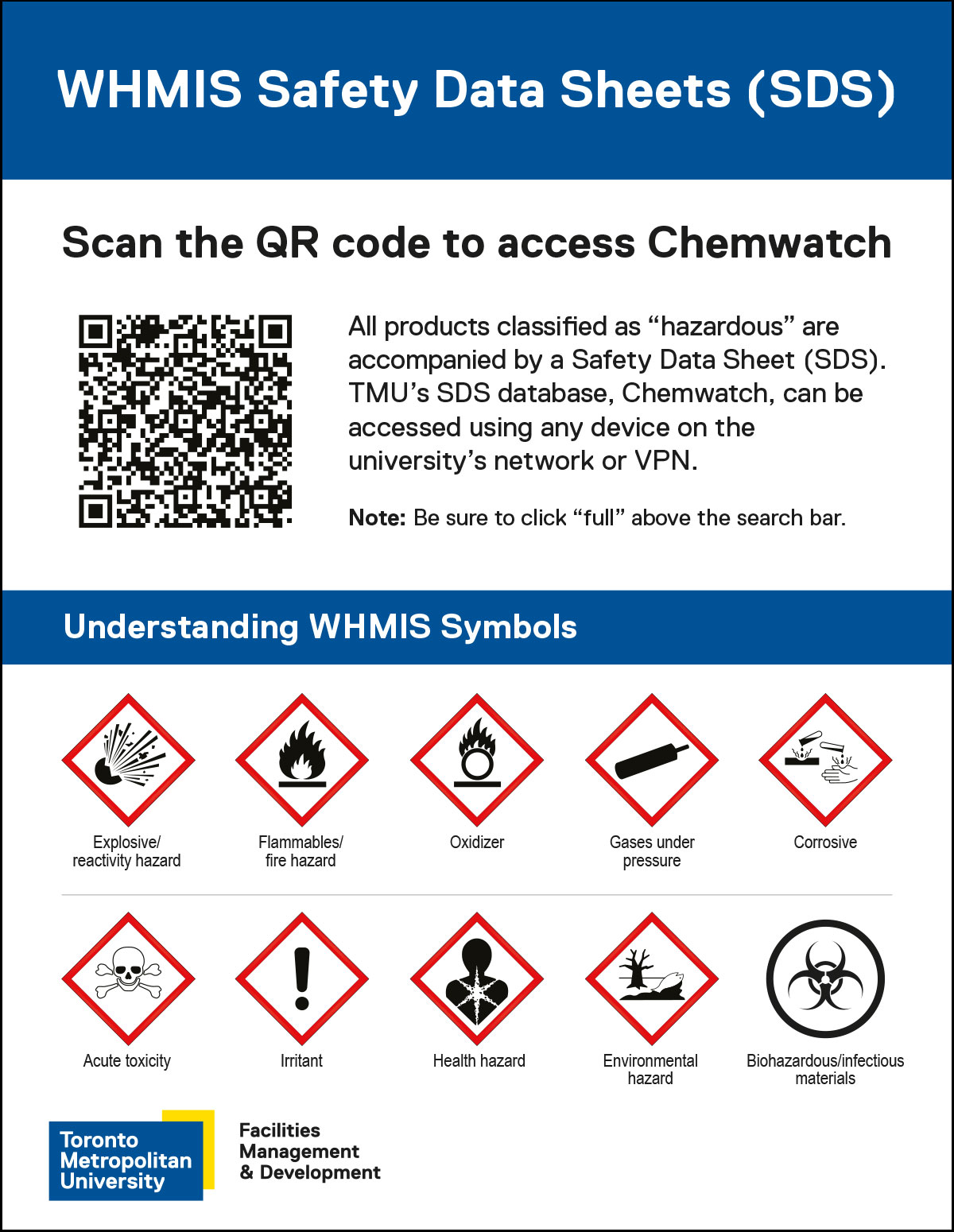
The Chemwatch SDS Database (external link) can be accessed from any computer or device at TMU. It does not require a username or password, but you must be logged into the network or TMU-VPN (GlobalProtect) to access the site.
To facilitate access, labs can download and print the (PDF file) WHMIS Safety Data Sheets (SDS) poster that links directly to Chemwatch through a QR code.
Note: The Chemwatch SDS Database link should also be bookmarked on all lab and office computers used by lab participants. If you need assistance accessing Chemwatch off campus, please contact EHS.
Standard operating procedures
Receiving hazardous materials
All goods must be received at the TMU Shipping and Receiving central dock located at 105 Bond Street where they are sorted and delivered regularly to all departments and buildings.
Transporting chemicals between labs in non-connected buildings or off-campus must be done in compliance with specific Federal Transportation of Dangerous Goods regulations. If you transfer dangerous goods, you are required to have Transporting Dangerous Goods (TDG) training.
Toronto Metropolitan University Lab at MaRS and iBEST
Hazardous materials destined for the Toronto Metropolitan University Lab at MaRS or iBEST are sent directly to:
- MaRS Discovery District, West Tower at 661 University Ave, 11th floor
- iBest, Li Ka-Shing Knowledge Institute, 209 Victoria St, 7th floor
Managing inventory – HECHMET
TMU is part of a consortium called Higher Education Cooperative for Hazardous Materials and Equipment Tracking (HECHMET). Its constituent institutions have similar goals for tracking and inventorying hazardous materials for community safety and security.
Tracking and tagging with Vertére
The HECHMET project is underpinned by the Vertére Inventory Manager (VIM) (external link) software, an online chemical inventory system used to track chemicals and other materials within the university environment.
All new hazardous materials being delivered to TMU receive a unique barcode, which is scanned and added into Vertére upon arrival at Shipping and Receiving. The unique barcode label identifies their:
- storage location;
- ownership; and
- SDS-related information (as required).
All Principal Investigators and labs have a unique username and password for accessing Vertére. Please contact chemical.inventory@torontomu.ca if you need an account created.
Tracking and tagging compressed gas cylinders
All full cylinders of compressed gas receive a unique barcode, which is scanned and categorized into Vertére, upon delivery to one of TMU’s compressed gas storage locations. Laboratories that use compressed gases should follow the steps outlined in (google doc) TMU-LAB-007 - Gas Cylinder Receiving, Transferring and Handling procedure. (external link)
This procedure outlines the specific details for maintaining inventory, returning empty cylinders and accessing cylinder storage locations. Successful completion of Compressed Gas Cylinder Training is required prior to accessing cylinder storage.
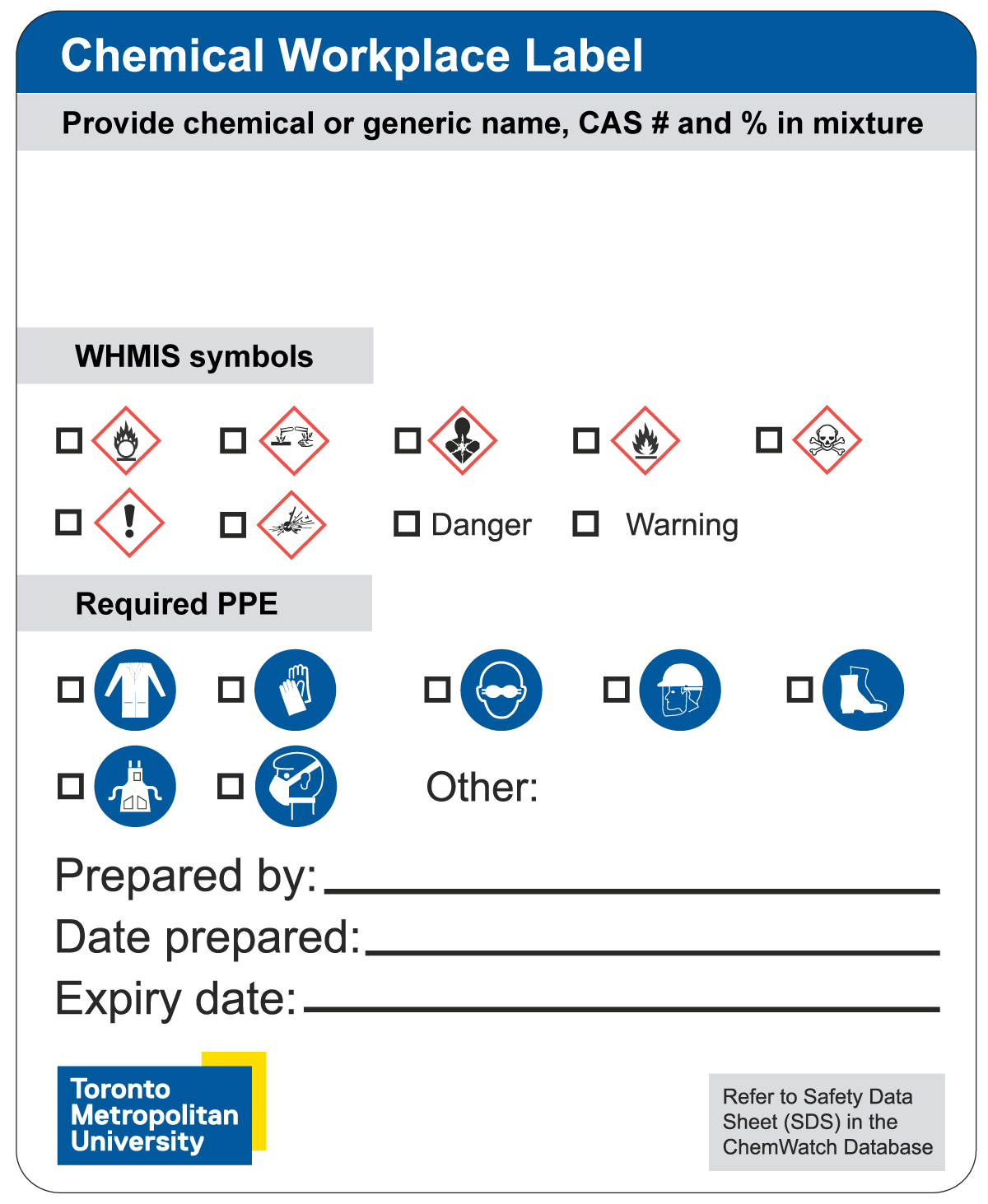
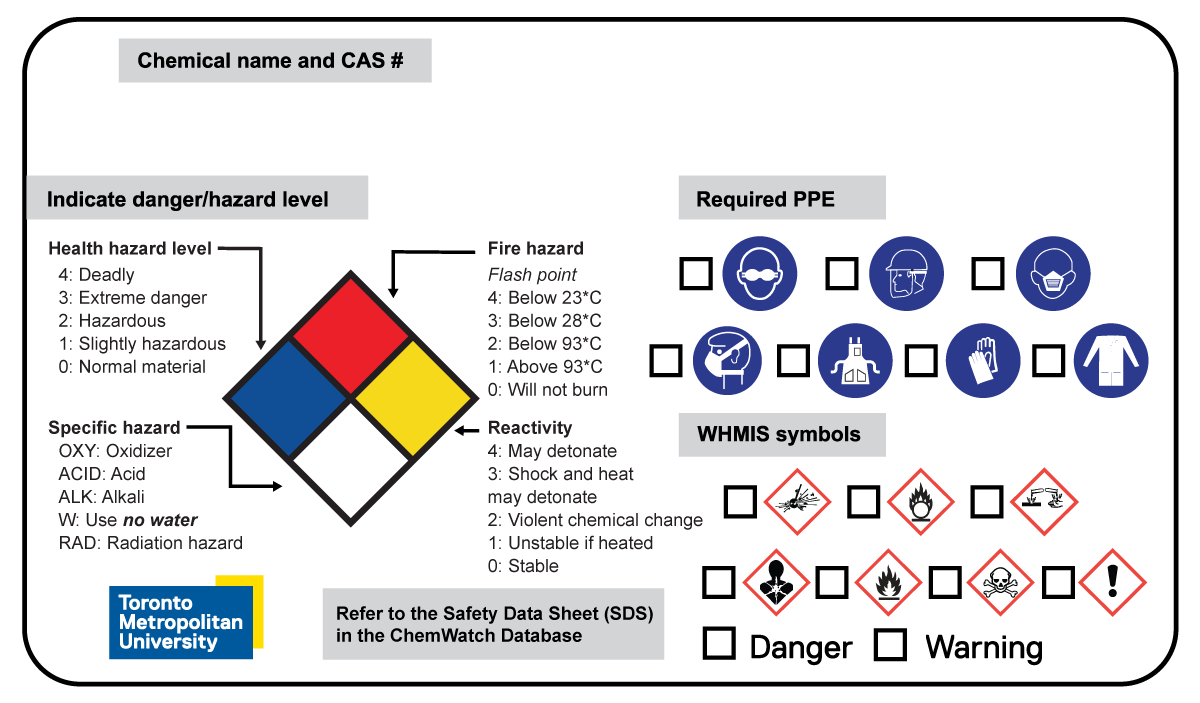
A Chemical Workplace Label is required for chemical solutions prepared/produced on campus. Two standard label templates are available.
Both template 1 and 2 (see below) allow the user to supply the following mandatory information:
- chemical or generic name
- Chemical Abstracts Service (CAS) number
- if it is a mixture, the percentage of each component chemical
- WHMIS symbols and indication if these pose a low risk (“warning”) or higher risk (“danger”)
- required PPE for handling
Template #1
Template #2
Users may choose to use this version of the template when they would like to have a system to compare similar products and their associated levels of danger.
- To order chemical workplace labels
- Visit the online ordering system for TMU’s chemical safety labels (external link) .
- Enter the password: “Ryerson” to access the system.
- Click on the desired template and sizes available.
- Select the quantity of labels, these are already chemical and water resistant.
- Select quantity of laminate covers (optional).
Note: For heavier chemical users, you may want to purchase the laminate covers in addition to the labels to prevent the ink from the markers to fade or be removed from harsh solvents used in the lab. - Add to cart.
- Apply coupon code: “Ryerson” to all orders over $115 to receive free shipping.
- Checkout.
Labels will be delivered within approximately 5 to 10 business days. If you have any questions, please contact Wholesale Safety Labels (external link) directly.
How to complete chemical workplace labels
- Name the product contents: Provide the chemical or generic name(s) and CAS number(s). If the solution includes more than one chemical, include what percentage of each mixture it contains.
- Check or circle WHMIS symbol(s) that apply
- Indicate risk level: For high-risk hazards, check: “Danger”. For less severe hazards, check: “Warning”. Find more information on these hazard phrases in section 2 of the Safety Data Sheet (SDS).
- Indicate what Personal Protective Equipment (PPE) is required while handling the chemical(s)
- If specific PPE is required but not listed, indicate the type of PPE under ‘Other’
- Provide additional information
- Name of the person that prepared and transferred the chemical(s) into the container.
- The date the chemical(s) were prepared and transferred into the container.
- Expiration date of the chemical(s), if applicable.
- Refer to SDS in Chemwatch: Find more information about any chemical by searching their SDSs in the Chemwatch database, including possible health effects and proper disposal methods.
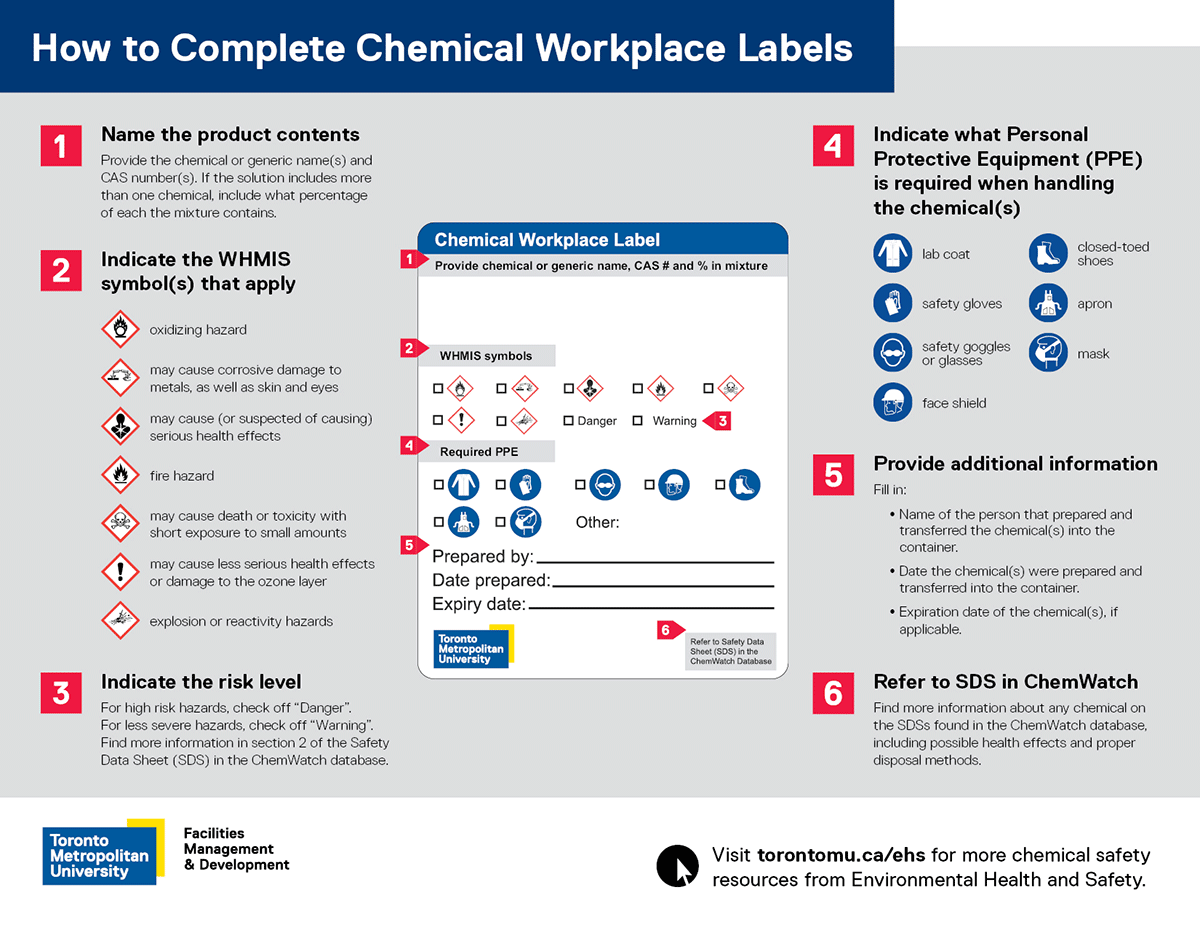
Download and print the (PDF file) How to Complete Chemical Workplace Labels poster which outlines the above instructions for chemical users.
It is critical to dispose of chemical waste properly so as not to cause harm to people or the environment. Please follow these steps:
- Collect chemical waste in appropriate leak-proof waste containers. EHS does not supply containers but they can be purchased at various companies, such as Uline, Acklands-Grainger, VWR and Fisher Scientific. Remember not to put incompatible chemicals in the same container. Keep the container closed at all times to minimize exposure.
- Label the container(s) using the (google doc) Hazardous Waste Disposal Label template (external link) available to TMU students, faculty and staff for print.
EHS is committed to accessibility for persons with disabilities. If you require this document in an alternative format, please get in touch with your department’s EHS contact. - Print the label, fill in the information by hand and affix it to your container.
- Request pick-up. Once your container is filled and labelled, it is ready to be picked up. Complete and submit an online Chemical Waste Disposal Request form for pick-up. When filling out the form, you will be prompted for information about the chemical after providing your contact information and the location where the waste resides. Please note the following:
- The tag number requested refers to the barcode number that the item has been tagged with for inventory. If you do not have a tag number, leave this field empty. If there is more than one tag number, you can add multiple tag numbers by clicking the “Add” button on the right side.
- Under the Chemical Composition field, please enter the composition of the chemical. This will help in determining the properties of the substance.
- Next you will be required to choose the physical form of the chemical from gas/aerosol can, solid and liquid. You will need to select either the Total Volume or Weight option, depending on the physical form.
- The last field will ask you whether any sharps are included in the waste. Please note there should be no biological sharps in the chemical waste.
- If there is more than one chemical waste item ready to be picked up, click on the “Add” button to enter the information for the next chemical.
- Submit the form when you are done.
Disposing of lithium ion batteries properly is critical to preventing severe fires during thermal runway events as well as stopping toxic chemical fumes and leaks from entering our facilities and the environment. Proper disposal also ensures hazardous heavy metals like cobalt, nickel, and manganese do not leach into surrounding soil and groundwater.
When a lithium ion battery requires disposal, please follow the same procedures as shown above for a hazardous waste pick up request:
- Collect the battery in a clear plastic bag or an appropriate leak-proof waste container with clear tape placed over the terminals. EHS does not supply containers but they can be purchased at various companies, such as Uline, Acklands-Grainger, VWR and Fisher Scientific.
- Label the container(s) with the building name and room number, contact name and department (e.g., CUI001, Jon Smith, Engineering Zone).
- Request pick-up. Once your container is filled and labelled, it is ready to be picked up. Complete and submit an online Chemical Waste Disposal Request form. When filling out the form, you will be prompted for information about the chemical after providing your contact information and the location where the waste resides. Please indicate Lithium ion battery as the chemical name. Container volume or weight can be estimated.
- Store safely. Keep the batteries in a cool, dry place until they are picked up.
For questions on completing the form, please contact chemical.inventory@torontomu.ca.
Damaged Batteries
If batteries show signs of damage or are swollen, immediately place them in a non-flammable material like sand or kitty litter inside a metal or plastic container. Submit a pick up request as shown above. Batteries will not be picked up unless they are properly contained and labeled.
All chemicals and compressed gases arriving on campus are now barcoded and inventoried upon arrival at Shipping and Receiving and prior to delivery to the user.
In order to keep the Vertére inventory as accurate as possible, any barcoded container from which contents have been emptied must be removed from the inventory. Please follow the simple process outlined below for disposal of empty containers or returning empty compressed gas cylinders.
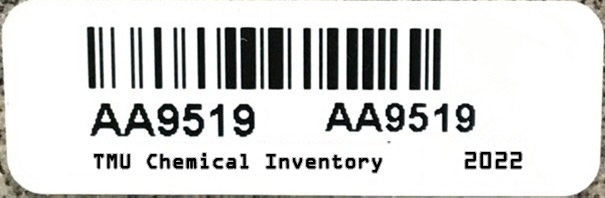
Disposal of chemical containers using Vertére
If you have access to Vertére (external link) , you can log in and locate your barcoded chemical within the database.
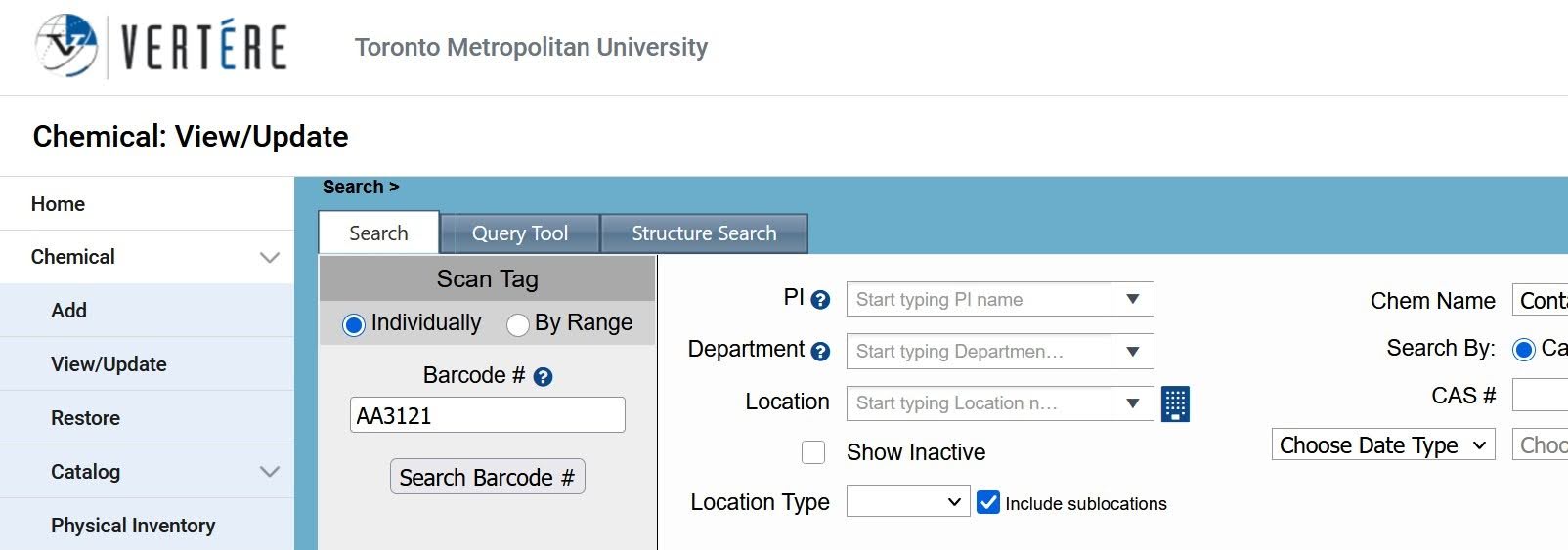
1. In the Chemical module, click on View/Update and type your alphanumeric barcode into the search field. Click ‘Search Barcode #’ to locate the barcoded chemical within the database.
2. Click on the box in front of the chemical name and hit ‘delete’.
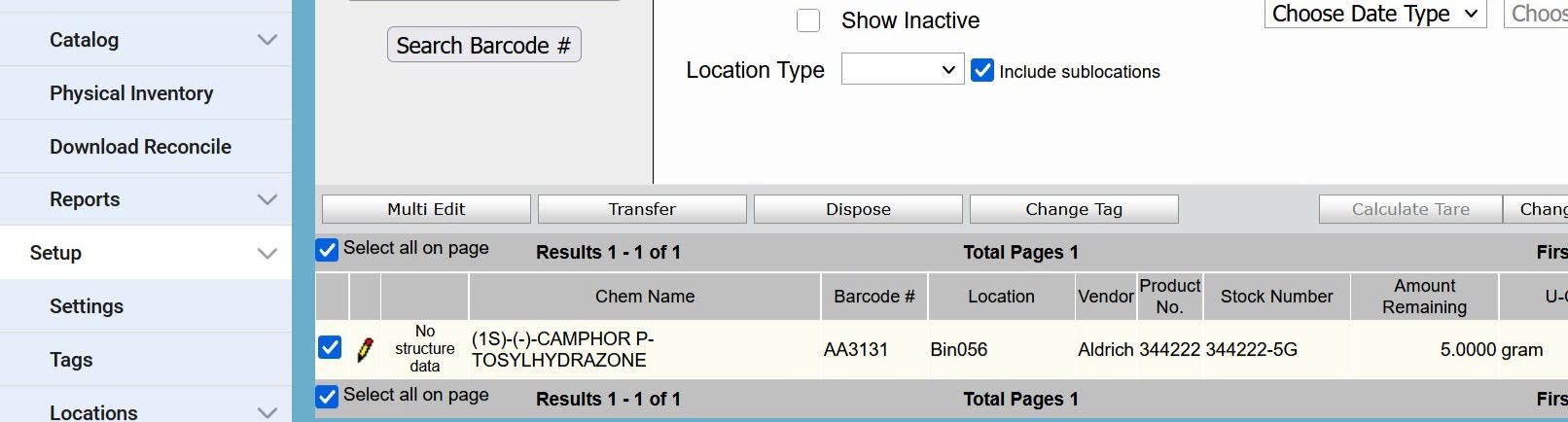
Your chemical has now been removed from the lab inventory in Vertére. The same procedure can be done for barcoded compressed gas cylinders.
If you do not have access to Vertére
Chemical container |
Compressed gas cylinder |
|---|---|
1. Take a picture of the barcode you would like to remove. Send the picture to chemical.inventory@torontomu.ca with “Remove barcodes” in the subject line. |
1. Send a pick up request for your empty cylinder to the supplier and copy chemical.inventory@torontomu.ca. |
2. Dispose of the container as required (e.g. hazardous, glass, recycling, etc.). |
2. Return your empty cylinder to the compressed gas storage location. |
If your container does not have TMU chemical inventory barcode
Chemical container |
Compressed gas cylinder |
|---|---|
Dispose of the container as required (e.g. hazardous, glass, recycling, etc.). |
Send a pick up request for your empty cylinder to the supplier and copy chemical.inventory@torontomu.ca. |
All broken glassware that is not contaminated by chemical or biological agents (e.g. microscope slides, slide covers and Pasteur pipettes) is to be deposited into a broken glass waste container. Wear gloves and use tongs or a dustpan to pick up pieces for disposal, and never pick up a broken chemical glass container with your bare hands.
When a broken glass waste container is full, close and seal the box, mark it as garbage and submit a service request to the Facilities Help Desk (Fixit) for a pick-up.
Chemical Emissions
By law, TMU is required to track and report the emission of certain air contaminants released to the environment. These include greenhouse gases and other pollutants such as volatile organic compounds. Auditing of TMU spaces that use chemicals and equipment that generate these air pollutants is conducted on a regular basis. To ensure compliance with federal, provincial and municipal reporting requirements, EHS maintains processes to track all air emission sources and quantities and reports these amounts to the respective legislative jurisdiction.
Legislation
The Chemical Safety Program is in compliance by law with the Occupational Health and Safety Act (OHSA) (external link) and the Workplace Hazardous Materials Information System (WHMIS).