Ergonomics and Body Mechanics

Toronto Metropolitan University’s Toronto Metropolitan University’s comprehensive ergonomics program offers students, faculty and staff a number of resources to help improve their workplace environments and support good body mechanics to prevent injury. These resources are designed to help everyone maintain an efficient workstation and healthy work habits for themselves and perform desk-based tasks or physical activities using correct practices to prevent physical and biomechanical hazards.
Why ergonomics matter
Ergonomics and body mechanics matter to everyone, whether you work seated at a desk or you’re on your feet or using equipment, such as in a lab, workshop, kitchen or mailroom. Both prolonged and repetitive task-related movement — including sitting — can lead to serious injuries, called musculoskeletal disorders (MSDs).
This page will help you prevent injuries in all these environments.
Musculoskeletal disorders
MSDs are injuries or disorders of the nerves, muscles, ligaments, tendons, joints and cartilage in the neck, back, lower and upper limbs. When these injuries result from work, they are referred to as “work-related” MSDs. Currently, they represent the number one type of lost-time work injury reported to the Workplace Safety and Insurance Board (WSIB) in Ontario.
Signs and symptoms of an MSD
The signs and symptoms associated with MSDs may come on gradually, seemingly without a cause, or can appear to occur with a simple daily activity. Symptoms include:
- headaches
- neck pain
- back pain
- tension in your wrists, arms, shoulders, neck and head
- fatigue
- stiffness
- numbness/tingling in your hands or feet
If you are currently experiencing any of the signs and symptoms of an MSD, seek the advice of a qualified healthcare practitioner, such as a chiropractor or physiotherapist, and promptly report it to your supervisor if they are related to work activities.
Training
Office Ergonomics: Aches, Pains and Office Strains
TMU’s training module on workstations and office ergonomics is about 60 minutes long and teaches how to recognize MSDs, how to adjust your workstation ergonomically and stretches you can do at your workstation.
There are a total of four modules which take approximately 45 minutes to complete in full. Upon completion of the modules, you will be asked to complete a form.
Manual Material Handling (MMH)
This course focuses on the safe handling and movement of materials to prevent injuries such as musculoskeletal disorders and minimize strain. It covers key topics including: proper lifting and moving techniques, the use of mechanical aids and working safely in awkward/static positions.
The Manual Material Handling training consists of one module divided into three sections. The entire training takes approximately 40 minutes to complete. At the end of the module, you will be required to complete a quiz to test your understanding. Upon successful completion, please print or email your certificate and provide it to your supervisor.
Step 1: Sign up for a Learner Profile
To sign up for either training modules related to ergonomics or body mechanics in manual tasks, follow these enrollment instructions.
Step 2: Complete the training in D2L
Upon successful completion, you will be provided with a certificate to download and print if required.
Self-study resources
Fact sheets
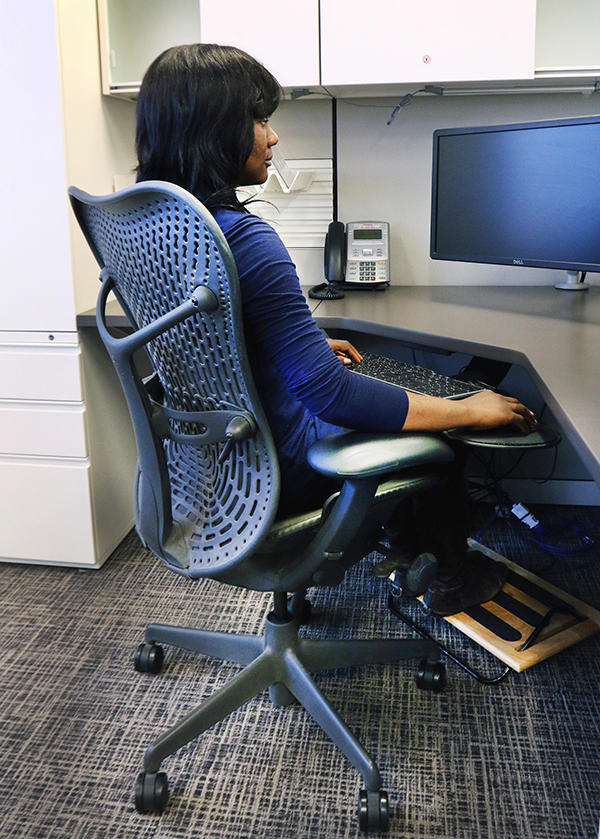
This fact sheet demonstrates how to ergonomically set up your workstation. Please check your workstation setup weekly to make sure you’re maintaining good ergonomic habits.

This fact sheet demonstrates some stretches you can do at your workstation. Ideally, you want to take a stretch break at least once every hour.
Ergonomic task chairs
For most people, a review and readjustment of your current chair settings will address discomfort caused by prolonged sitting. In circumstances when a chair is no longer functioning correctly and cannot be repaired, speak to your manager.
In the event that you require a new chair, employees and their manager are invited to choose one which meets the (google doc) university’s specifications (external link) , which are based on ergonomic standards. Additional customized support is also available from the vendor if required. Please refer to the university’s Vendors of Record & Common Purchases for a list of suppliers.
If you have a disability or medical condition(s) and require accommodation, please submit a request to HR.
For more information
For more information or to provide feedback on the Office Ergonomics Program, please contact EHS at 416-979-5000, ext. 553770 or ehs@torontomu.ca.
If an employee is under the care of a medical practitioner and workplace accommodations are required, please submit a request to HR.