Login instructions for all AEM users automatically transitioned to the Touch UI
October 15, 2021
At 7 a.m. on Monday, October 18, all AEM users will be automatically transitioned to the Touch User Interface in both development and production environments
It is important that you review the following instructions before you log into AEM.
- Clear your browser’s history & cache
Continue to log into AEM using
- Production: https://cmshost.ryerson.ca/aem/start.html
- Dev: https://cqauthor.dev.ryerson.ca
Or you can log into the new AEM start page via:
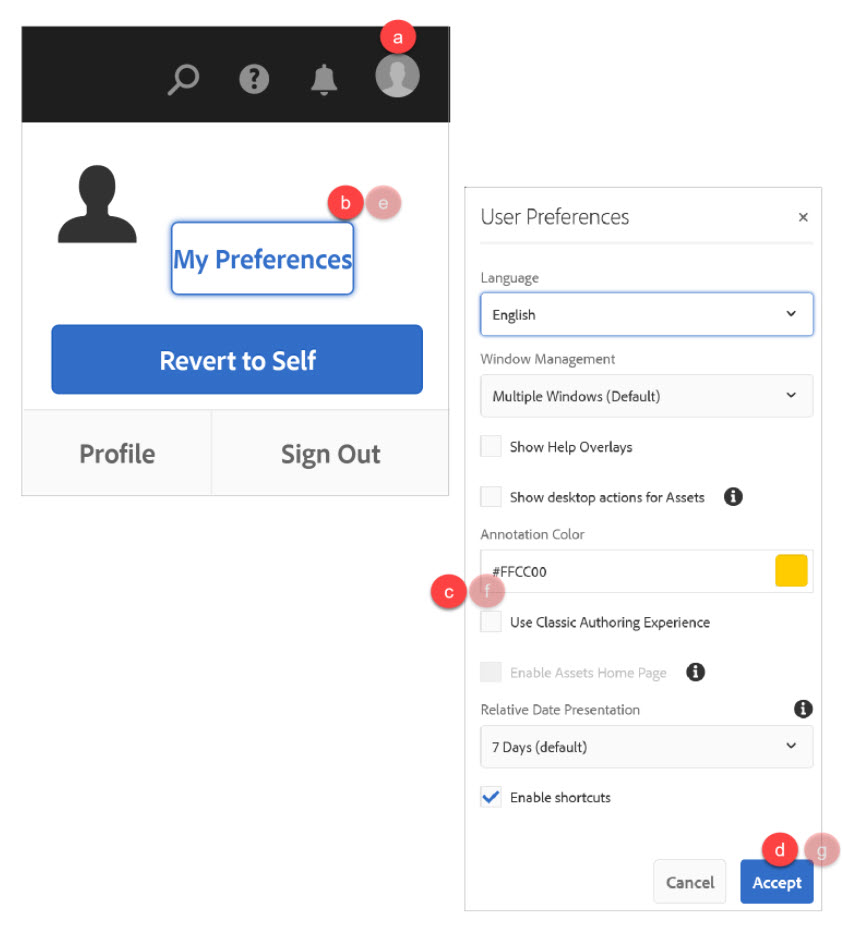
Set your user preferences:
- Click on your profile icon
- Go to 'My Preferences'
- Find the 'Use Classic Authoring Experience’ field> Click check box
- Click 'Accept'
- Then, go back to 'My preferences'
- Uncheck the box
- Click 'Accept'
If any of the following appear, do you not use them:
- Import
- Content fragments
- Live copy
The change to this new interface is significant and the completion of training is absolutely necessary as support for non-trained authors will be limited.
All new users must register and complete Touch UI training to gain access to any AEM website.