Access to TMU Buildings

At Toronto Metropolitan University, all exterior campus building doors are locked and require a OneCard to gain access to the interior of campus buildings.
All main exterior campus building doors are equipped with a card reader. To gain access, please tap your OneCard against the card reader at a main exterior building door and you will be granted access to the building. Please note that some building perimeter doors are exit only and cannot be accessed via your OneCard.
Community members are advised to carry your OneCard with them at all times in order to avoid delays to your ability to access campus buildings.
How this may impact you if you are accessing campus
If you already have a card, no action is required
As long as you have an active student registration, your OneCard will grant you access to campus buildings.
If you are a TMU undergraduate or graduate student without a OneCard
Students who do not have a OneCard must apply for a Digital OneCard online, as it is required to gain entry to campus buildings. For more information, please visit the OneCard website.
If you already have a OneCard, check the back to determine if you have the right one
Chang School students who have previously received a OneCard with an RFID chip will automatically be granted access to campus buildings.
To determine whether you have a OneCard that will work automatically, refer to the back bottom right corner below the magnetic strip. OneCards with an RFID chip have an 18 digit hotstamp number.
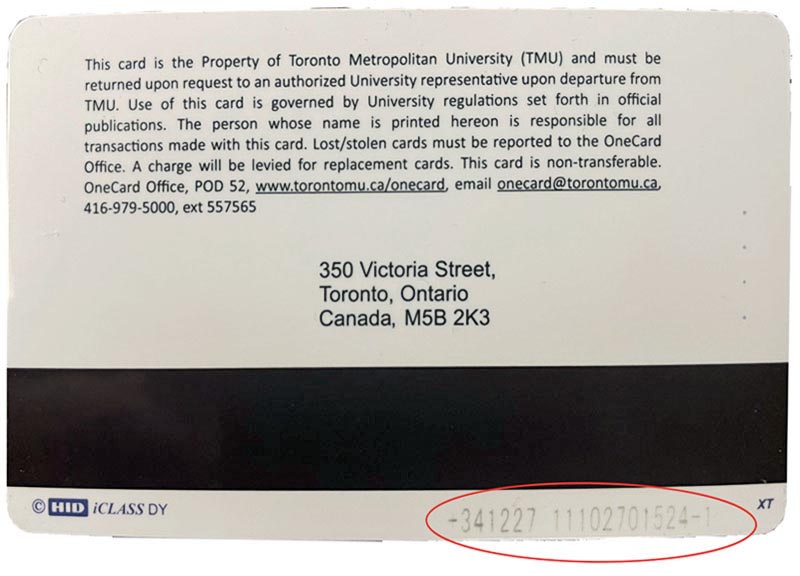
If you don’t have a card or do not have a card with a hotstamp number, please apply for one
Chang School students who do not have a OneCard who need to visit the TMU campus should apply for a Digital OneCard online, as your OneCard is required to gain entry to campus buildings.
If you already have a card, no action is required
As long as you are an active employee, your OneCard will grant you access to campus buildings.
If you don’t have a card
New employees who have not received a OneCard must pick up their OneCard from the OneCard Office. For information on when and where to pick it up, please visit the OneCard Office website. If you do not have your employee number, please submit a request to HR as your employee number is required to pick-up your card.
Employees who have lost their OneCard may request to pick-up a replacement card by following the instructions on the replace your card page on the OneCard website.
What happens if I’ve forgotten my OneCard?
In the event you have forgotten your OneCard, you can gain access to campus buildings by contacting Community Safety and Security.
If the building entrance has an intercom, buzz to connect with Community Safety and Security
Once an intercom has been activated, you will be connected with a member of Community Safety and Security. You will be asked to verify your identity and affiliation with TMU before being granted access to the building.
Please note that calls will be answered in priority sequence as soon as a staff member is available.
If the building does not have an intercom, contact Community Safety and Security
Call Community Safety and Security to gain entry
Some campus buildings are not equipped with an intercom at their exterior entrance doors. If you’ve forgotten or lost your OneCard, you can contact TMU Toronto Campus Security at 416-979-5040 or TMU Brampton Campus Security at 416-598-5950.
You will be asked to verify your identity and state the name of the building you are attempting to access. A Community Safety and Security team member will be dispatched to your location to let you into the building.
If you don’t have a cell phone, activate a blue emergency phone to connect with Community Safety and Security
In the event you’ve forgotten your phone and are unable to call Community Safety and Security, you may activate the nearest blue emergency phone to connect with a member of their team. To locate an emergency blue phone on campus, use the legend feature on the TMU campus map.
You will be asked to verify your identity and state the name of the building you are attempting to access. A Community Safety and Security team member will be dispatched to your location to let you into the building.
External guests
If you have invited an external guest to campus (including guest lecturers and contractors), you are responsible for letting them into buildings on campus.
In the event you are unable to let your guest into a campus building, please contact Community Safety and Security and they will assist you. Please be prepared to provide Community Safety and Security with your name, the name of the external guest and your contact information.
Questions?
If you have any questions, please contact TMU Toronto Campus Security at 416-979-5040 or security@torontomu.ca or TMU Brampton Campus Security at 416-598-5950 or somsecurity@torontomu.ca.