Do you use Turnitin on your Brightspace Assignments? New Turnitin Option: Institutional Repository
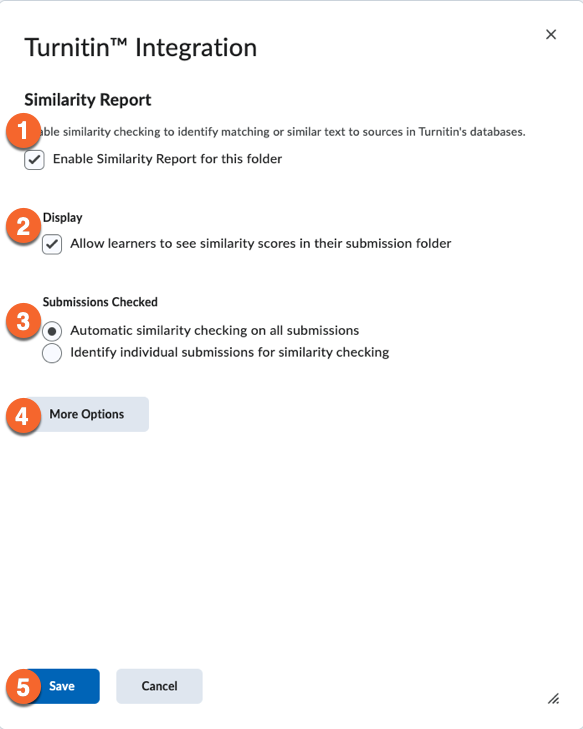
To better protect student privacy and intellectual property, we have added the Institutional Repository setting to Turnitin assignments.
What is it?
The Institutional Repository stores student papers in a secure, TMU-only database. Submissions are still checked against internet sources and global publications, but they are not added to Turnitin’s global database and cannot be accessed by other universities.
Why it matters
This option helps protect student intellectual property while still allowing instructors to detect similarity within TMU. It offers a strong balance between academic integrity and student privacy.
How do I use the Institutional Repository in my Turnitin assignments?
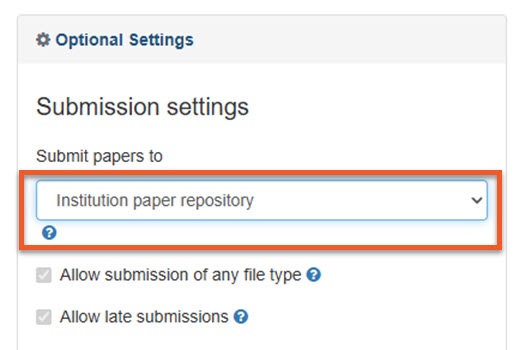
When you enable Turnitin, click on More Options, then choose the Institutional Repository from the Submit papers to dropdown.
Make sure you check that this setting is selected every time you use Turnitin for an assignment in Brightspace.
For a full breakdown of the Standard Repository, Institutional Repository, and No Repository options, please visit our updated Turnitin Instructor Guide.