Send an email copy of an announcement to your students
In D2L Brightspace, since it's the first thing students see when they visit your course shell, the Announcements tool is a great place to post time-sensitive information that only applies to that group of students, such as last-minute classroom changes, or reminders about pending assessments.
Also, Announcements are NOT copied when you copy a course shell in the future. This ensures that you don't accidentally disseminate information that other students shouldn't see.
When Instructors create a new announcement in a course shell, they can now choose to send a copy to all users in the Classlist as an email, sent as if from the instructor themselves.
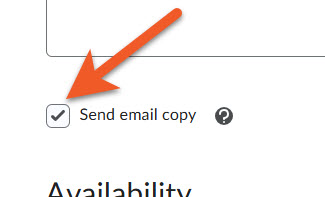
In the user interface for creating or editing an announcement, a new Send email copy checkbox now appears when you create or edit an announcement.
When you select the new checkbox, the system emails the content of the announcement to all users in the Classlist when the announcement is published, whether you publish right away, or set a start date/time so that the announcement is published later, so that you can prepare your communications ahead of time.
Users who are not subscribed to receive a notification for announcements will also receive the email, ensuring that important information contained within the announcement is delivered to every student. (This does mean that some students will receive duplicates, but that's okay!)
Our experience with this new functionality shows that most emails are received within 5-10 minutes.
We still encourage you to ask your students to turn their notifications on, but in case they haven't done so, this is a great way to ensure that your students receive time-sensitive information.