July improvements in D2L Brightspace
Assignments: new flexible 'text or file submission' option
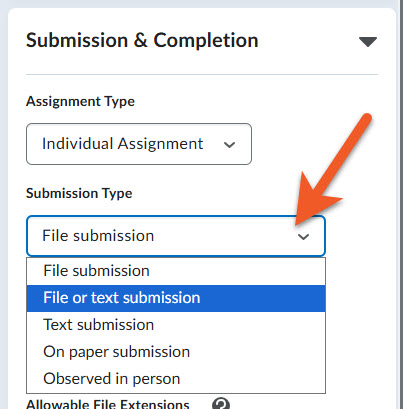
In the past, when choosing the Submission Type in an assignment, you could choose from File submission, Text submission, On paper submission, or Observed in person.
Now, there is a new type, called "text or file submission". This is a hybrid of the two types, which makes it possible for you to be flexible when accepting submissions from students.
One example of this might be when students are expected to upload a large file, such as a video. If the video is too large (over 1Gb), or if the student has problems uploading to Brightspace, they can now load their file somewhere else, such as Google Drive, add the appropriate sharing permissions for their instructor's email address, then provide the link to their file, along with any relevant information in the "text submission" field, instead of struggling with their upload. This makes it possible for you to still track their submission in D2L, and easily grade within the Assignments tool, regardless of whether the student uploaded a file, or provided a short text submission with a link.
Please note that you cannot use Brightspace's built-in Annotations tool or Turnitin with text submissions.
Quizzes: Reopen a submitted quiz attempt
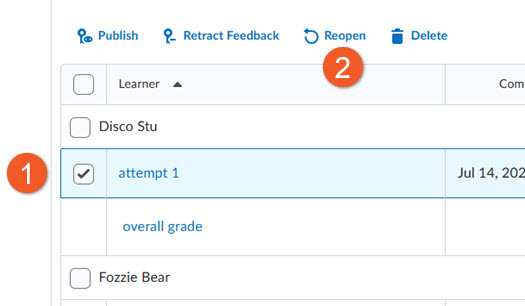
In the past, instructors could not reopen a quiz attempt that was already submitted. The "reopen" tool makes it possible to switch a quiz attempt to an unsubmitted state and adjust time limits if needed, so that the student can re-enter and resume their quiz from where they left off.
This supports scenarios where students have experienced a technical problem, ran out of time or missed the quiz end date, reducing frustration from auto-submissions and improving overall quiz management flexibility.