What a TMU student's course schedule looks like
Have you ever wondered what the course schedule of a current Toronto Metropolitan University (TMU) student looks like? If your answer is yes, then you’re in the right place.
As a fourth-year English student in my last semester of my degree, I’ve spent a lot of hours customizing my schedule over the years. However, with trial and error, I’ve learned just how important it is for students to create an enhanced schedule that goes beyond what’s been assigned to them. This blog will unpack everything you need to do to ensure that you’re organizing your daily tasks around your courses effectively. By creating a weekly schedule that addresses your personal and academic needs, you can avoid missing deadlines, falling behind on your assignments and feeling overwhelmed throughout the semester. Here’s a glimpse into what my (scheduled) life looks like as a TMU student, and what yours might look like, too!
My course schedule
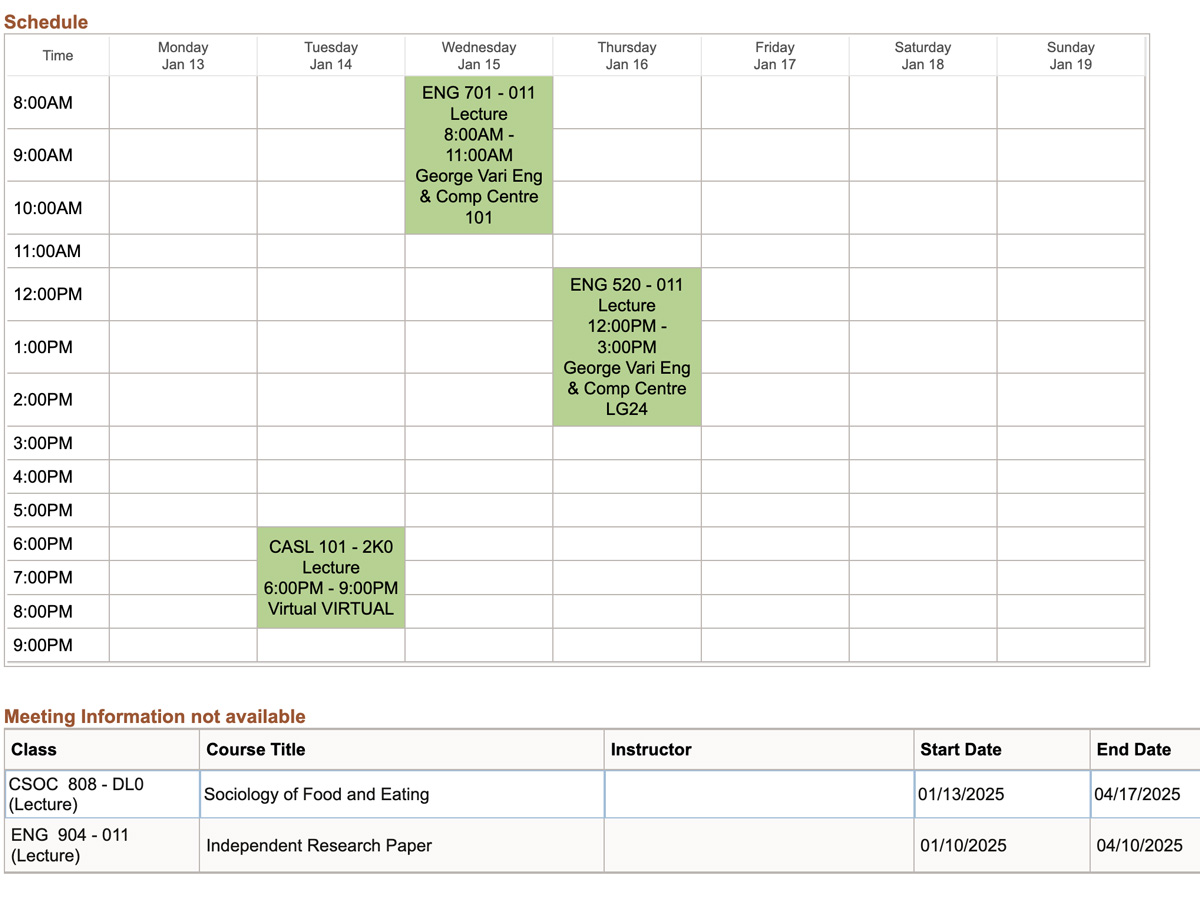
Every TMU student’s schedule looks different. I was able to enrol in a few online courses and an independent study course as part of my last semester.
Here’s what my current course schedule looks like in MyServiceHub (my student portal). Depending on your program, your course load will vary. I find that five courses per semester is the average, but it could be more or less!
My program allows me to be pretty flexible with the courses that I take. This semester, I’m taking three core English electives (ENG 701, ENG 520, ENG 904), an upper level liberal (SOC 808) and ASL 101.
I’ve also spaced out my courses so that I have enough time to relax, get work done or commute in between lectures. However, unless I forget which room one of my classes is in, I hardly ever refer to this schedule. Instead, I use Google Calendar as my weekly survival guide.
My course schedule in Google Calendar
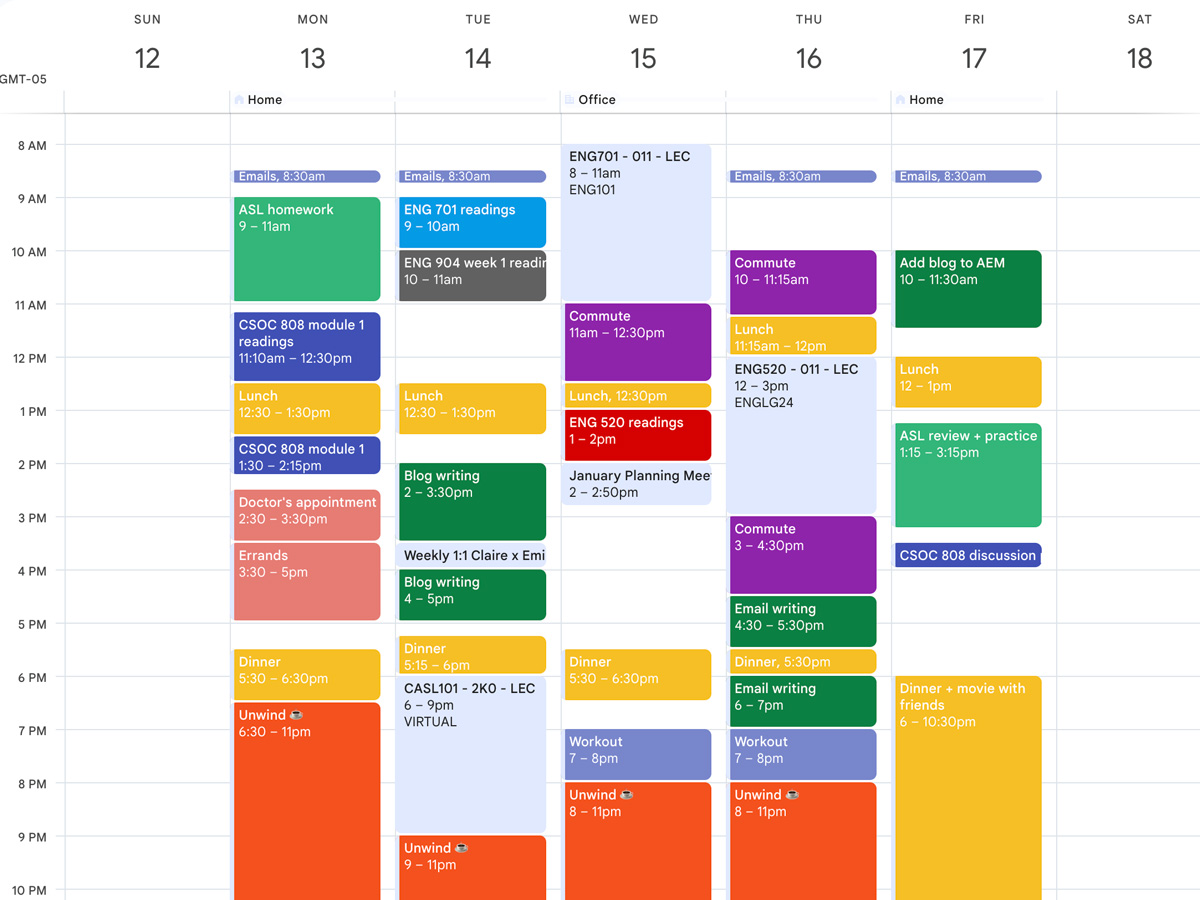
All TMU students have their courses automatically added to their torontomu.ca Google Calendar, so you won’t have to add them yourself.
Don’t panic! My schedule might look overwhelming at first, but if you take a closer look, you’ll notice that not every task in my calendar is a “to-do.”
I use the calendar block method to plan out my entire day (including breaks and personal tasks) so I can prioritize time for myself and meet important deadlines. After I’ve reviewed my course and work tasks at the beginning of each week, I’ll block out the estimated time from Monday to Friday in my calendar.
I’ll also colour-code my tasks based on their category. For example, yellow is for meals, purple is for commuting time, dark green is for work tasks, orange is for me time and the rest of the colours are assigned to a different course.
You might be wondering what all of these empty spaces are for — I’ve added these just in case I need to move things around or take a break in between tasks. I think it’s important to give yourself enough time in your schedule to take a breather and plan your day based on how you’re feeling in the moment. You might not end up following your schedule exactly, but structuring your day can give you a clear idea of what tasks you need to complete and how long you should take to complete them.
However, even though creating a schedule is pretty simple, following it can be difficult. To help you avoid falling into this habit, I’ve unpacked my top three tips for successfully managing your time alongside your courses!
1. Always make to-do lists
Alongside crafting a detailed weekly schedule, try to make a daily to-do list so you don’t lose sight of what needs to get done. I like to use Notion (external link, opens in new window) , but a simple Google Doc also does the trick. Try listing your tasks from most important to least important so you’re not spending too much time on what’s unnecessary. This will also help you get a better idea of how much time you should spend on each task, which will come in handy during your weekly planning sessions. I also like to make to-do lists whenever I feel like I have too many things on my mind. Writing everything down helps me clear my head, which is really helpful during stressful times.

2. When in doubt, plan ahead
Do you have a huge gap in your schedule and not sure what to fill it with? Look ahead and see what tasks you can get a head start on. Maybe you have a big test in a couple weeks or a long assignment that needs to get done towards the end of the semester — either way, fill in your spare time strategically. If I’m having a slow week, I’ll either spend my free time getting ahead at work (which might involve writing a blog or email for future students like you!) or completing a few of my course readings for the following week. You might not feel like you need to jump ahead in the moment, but your future self will thank you for it.
3. Create a realistic workload for yourself
If you’re feeling like you have too much on your plate, don’t be afraid to lighten your workload. We all have weeks where our ambition gets the best of us. Sometimes I can get ahead of myself and block out more tasks in my schedule than I’m actually capable of completing. It’s super important to remember that your weekly schedule isn’t set in stone, so don’t be afraid to make changes as the week goes on. Unexpected life changes might also force you to make some adjustments. At the beginning of each day, make sure to spend some time to reflect on your priority tasks and work on those first. Take the semester one task at a time!

What I’ve learned about time management since first-year
In my first year, I was convinced that I needed to get everything done at once in order to be successful (I was wrong). Sometimes we need a break, and that’s okay. It’s important to learn how to “chunk out” your time by working on a little bit of a big task over several days to help you avoid leaving it to the last minute. I also learned that finding the motivation to complete weekly tasks doesn’t always come easily, and sometimes you might have to push yourself to get things done. There are going to be a lot of things that we don’t want to do, but by pushing through, you can avoid falling behind. It’ll all be worth it once you hit that “submit” button.

I hope this glimpse into my weekly schedule has taught you how you can successfully plan your weekly schedule as a future TMU student! To help you plan ahead, check out our program pages to find out which courses are offered by each program.
It’s also important to remember that it’s impossible to be a professional scheduler right away. Take some time to figure out what works best for you, even if that means stumbling a little bit along the way.
Talk to you soon,
Claire